Tuesday, July 14, 2020

If this is the Razer Phone 3, color us disappointed

The last time Razer released a smartphone was back in 2018 with the Razer Phone 2. The company has been mum on the future of their handsets, although back in 2019 it seemed like a third Razer Phone could be in question as the company was cutting some of their workforce that used to work on the Razer Phone.

But could Razer be looking to revive their mobile efforts? Maybe. This is thanks to a couple of images posted onto Twitter by @Boby25846908 who claims that someone had sent him photos that are alleged the prototype of the Razer Phone 3. Upon first glance, it seems that the design of the Razer Phone 3 looks almost identical to its predecessor.

Taking a closer look at the phone has revealed some potential changes, such as how the top and bottom bezels on the front of the phone have shrunk by a bit, and how the camera orientation on the back of the phone has also changed from horizontal to vertical. It also seems that it now sports a triple camera setup versus the dual camera setup from before.

That being said, it is unclear what these photos could mean. It is possible that these photos might be of an older prototype that Razer was working on. We wouldn't be surprised if Razer had been prototyping a possible third Razer Phone before the rumors of its workforce being cut.

It is also possible that this could signal that Razer might have decided to pick up where they left off and begin working on their third device. We should note that it is quite rare to see companies sit out an entire year of not making a device, only to successfully stage a comeback, so maybe don't get your hopes up for now.


from Phandroid https://ift.tt/38TgK5f
via IFTTT

Monday, July 13, 2020

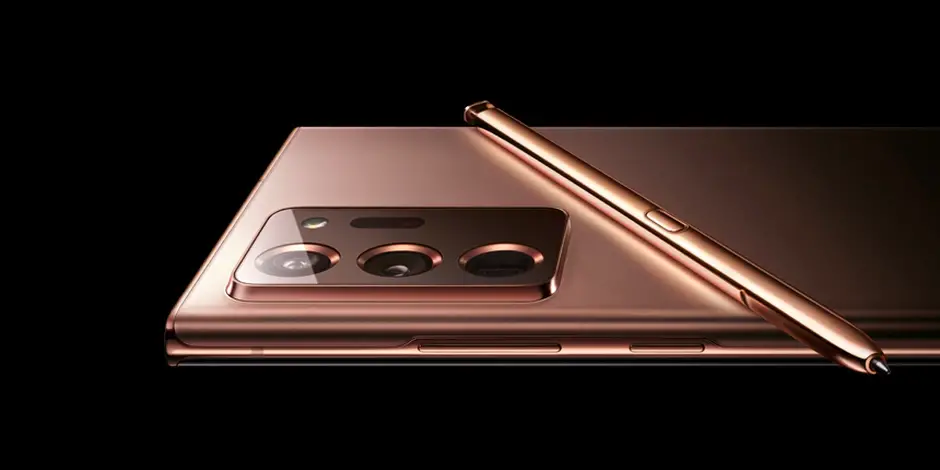
Samsung Galaxy Note 20 rumor roundup: design, price, specs, cameras and availability

In case the Samsung Galaxy S20 series was a bit disappointing in your opinion, or maybe you want a phone with a larger display, or maybe you're just a fan of Samsung's Galaxy Note series, then you might have heard that Samsung is expected to officially launch the Note 20 series at a Galaxy Unpacked event that they will be hosting next month.

While there are no official specs of the phone available yet, we have come across plenty of rumors and leaks that might be of interest to you, so check them out and also be sure to check back with us on the 5th of August for all the official details.

Design

If you liked what you saw with the Galaxy S20, then there is a good chance you will like what you see with the Note 20. This is because based on the leaked renders we've seen, the Note 20's design will not be straying too far from the Galaxy S20.

Even the camera bump on the back of the phone, based on the renders, are very reminiscent of the Galaxy S20. You can take a look at the phone's alleged design in this video below shared by Jimmy Is Promo in which he seems to have gotten his hands on what appears to be a working version of the Note 20 Ultra.

Display

If the rumors are to be believed, Samsung could launch three variants of the Note 20. This will come in the form of the base Note 20, then there will be a slightly larger version in the Note 20 Plus, and an even larger version in the Note 20 Ultra.

The differences here are mainly in the displays where the Note 20 could sport a display between 6.4-inches to 6.7-inches, while the Note 20 Plus could come with a 6.9-inch display, while the Ultra model is said to sport a display that could creep over 7-inches. This might sound pretty huge, but given that the bezels on our smartphones have shrunk drastically over the years, we imagine that it should still be somewhat manageable.

As for the refresh rates, we're hearing that the phones could use a 120Hz display, but whether or not it will be limited to the higher-end models remains to be seen. A tweet by Ice Universe also suggests that Samsung will have a more "fine-tuned" version of the 120Hz display, meaning that it could use less battery than its Galaxy S20 counterparts.

Performance

Given that this is a flagship smartphone, we expect that the Note 20 lineup will most likely come with flagship hardware. If this had been a few months ago, we would have assumed that it would most likely be powered by the Qualcomm Snapdragon 865 chipset, but given that Qualcomm had recently announced the Snapdragon 865 Plus chipset, it's almost a guarantee that this is what the Note 20 will be using.

Also, with Samsung using a mix of both Exynos and Qualcomm chipsets, there is a good chance that this tradition will continue. Unfortunately though, while the Qualcomm chipset Samsung could be using might be an upgraded version of the Snapdragon 865, the Exynos version will apparently still be the same Exynos 990 chipset which powers the Galaxy S20 series.

Camera

If you were hoping that the Note 20 series would come with an upgraded quad-camera setup, you could be disappointed. This is because based on the renders and rumors, it seems that the Note 20 lineup will continue to use a triple camera setup, but there will be some differences between the models.

For the base Note 20, it has been rumored that it will sport a 12MP wide-angle camera, a 64MP telephoto camera, and a 12MP ultrawide angle. As for the Note 20 Plus, it will sport a 108MP main camera, a 12MP telephoto camera, and a 12MP ultrawide angle. There are also rumors that it could support 50x zoom and will have a laser autofocusing feature that will help closeup shots.

There is no mention of the Note 20 Ultra, but there is a chance it means that it could use the same setup as the Note 20 Plus, just with a larger display.

As for the front-facing camera, there have been rumors claiming that the Note 20 could finally come with an under-display front-facing camera. If these rumors don't pan out, then there is a very good chance Samsung will return to using the hole-punch design.

Pricing and availability

Samsung will be officially unveiling the handset on the 5th of August, which means that a release date is probably not too far behind. According to leakster Jon Prosser, he claims that the Note 20 series will be officially released on the 20th of August.

There is still no word on pricing just yet, but a report out of Korea did suggest that it could be slightly cheaper, at least as far as the top-of-the-line model is concerned. The report suggested that the Note 20 Ultra could be priced at 1.45 million won, which is roughly 50,000 won cheaper than its predecessor and roughly works out to be $1,200. We're not sure if this will be applicable across all models, but fingers-crossed that it will be.


from Phandroid https://ift.tt/2On4ksR
via IFTTT

5 Critical Reasons Why Businesses Should Update Their Mobile Android Apps in 2020

As the digital landscape advances at a high pace, the way businesses function is entirely different from what it used to be a couple of years ago. Companies need to take into consideration the digital transformation that their business is going through and act in a way that helps this transition, rather than diminishing it. 

Mobile applications provide retailers have become the primary method of communication with their customers. As with more than 3.5 billion smartphone users globally, it is only understandable that companies want technology to increase business potential with well-made mobile apps. 

Despite the multiple benefits that a mobile application has to offer to e-commerce businesses, there are still companies out there that believe that a mobile app is more of an additional feature, rather than a necessity.

Another commonly encountered problem with businesses while developing mobile apps is that they tend to forego the significance of frequent maintenance (updates). Once they've created and launched their mobile app, these businesses make no effort to update or improve their application, which could prove extremely dangerous for their business in the long run. 

Fortunately, in an attempt to help our readers come to terms with the significance of developing, as well as updating a mobile application, we've compiled an article that delves deep into everything that there is to know about mobile apps, starting with why you might need one. 


Why Do Businesses Need Mobile Applications? 

 If you've read our article up till this point, and are still unconvinced about the significance of mobile apps, we've still got a few solid reasons up our sleeves that may convert you. 

More and more people use their mobile phones for online shopping, and Nathan Finch from Aussie Hosting advises the owners of e-commerce stores to invest in an e-commerce platform that is mobile friendly. This way your customers can easily access your store wherever they are which could significantly increase your sales.

Recent data coming out of Australia's Digital Foreign Affairs and Trade (DFAT) group support Finch's claim; e-commerce market share, as a percentage of total retail, continues to grow rapidly down under.

Some of the most valid reasons as to why businesses, particularly e-retailers, need a mobile app, consist of the following: 

  • Mobile apps are an excellent marketing tool. It is crucial for companies today to market themselves as much as they can on mobile. By investing in the development of a mobile app, companies can ensure that their products and services reach their customers at the right place and time. By utilizing the mobile application, users can get details about the company and information on the latest promotional offers and news. 
  • Businesses can offer better customer service through mobile apps. One of the most significant benefits of creating a mobile app is that it offers consumers a direct link to support.
    This provides the e-retailer with the golden opportunity to better enforce their customer service and is one of the reasons why investing apps like Robinhood have become so popular with millennials in recent years. It also gives users access to information about your business by providing fast and simple ways to get in touch with your business. 


  • Having a mobile app gives your business a competitive edge. Since today's e-commerce landscape features multiple retailers offering the same product, or service that you do, designing a mobile application might be the very thing that separates you from the rest of the competitive herd. Furthermore, if you run a small business, offering your consumers the luxury of a mobile application is to improve your company's reputation relative to the competition.
  • Businesses can expect better customer loyalty. By making an investment in the development and maintenance of a mobile application, companies can enjoy the support of a loyal and efficient customer base. Through the multiple perks that businesses will be able to offer consumers through the mobile application, such as the better and effective distribution of rewards and frequent updates about promotional offers.- businesses will be able to leverage their mobile apps to enforce customer loyalty. Having a mobile application significantly aids small companies by enabling them to connect with a loyal clientele. 


Why Should Businesses Update Their Mobile Applications? 

If you've gotten through the tedious process of mobile development, once you've launched the application, you might be tempted to leave the mobile app. Not only can the mistake of 'leaving the app as it is' cost you thousands of dollars, but it could also potentially put you out of business- which is why frequently updating your mobile app is critical for a business's survival.

Some of the most crucial reasons backing up the significance of updating your mobile app, consist of the following: 

Removing Bugs

Perhaps the greatest hindrance in consumers enjoying a seamless mobile app experience is the existence of bugs. If you've got bugs present within your mobile application, not only will consumers stop using your app, but they will also avoid buying from you in the future. 

To guarantee that your consumers are being offered the best possible experience through your mobile application, we'd suggest that you undergo a strict testing cycle. Only by daily testing, businesses ensure that their mobile application is free from any bugs, along with remedying any flaws caught immediately.  

Contrary to popular belief, testing the mobile app once before its launch will not detect all the security vulnerabilities and bugs present within the app. Additionally, there is no telling that there won't be any bugs that arise once you've launched the application, which is why it is so significant that you update the app frequently and test for any bugs and security vulnerabilities continually. 

Combatting Security Issues

Operating a business in the ever-evolving threat landscape is severe enough, but it takes a turn for the worse when we account for the threats and vulnerabilities targeting mobile applications specifically. 

Since customers will be entering their financial information, and other confidential data on to your application, there's a high risk that hackers and other malicious entities might gain access to this data, and exploit it for their own benefit. 

Businesses should ensure that their consumers' data is being protected. The e-retailers must exercise innovative technology solutions to ensure that their users' private information remains private. Furthermore, a lack of security within your mobile app will drive customers away since they'll be wary of entering their data. 

The easiest way to uphold cybersecurity within your application is through regular updates. By utilizing tracking tools and top tier security solutions, businesses can ensure that their organization is safe from the perils of a data breach.

Leveraging the Latest Technology

Since your business's mobile application will work in tandem with popular mobile operating systems such as Android and Apple, companies need to stay on top of updates within these OS to ensure that their mobile app's useability isn't affected by it. In a worst-case scenario, businesses can see their mobile app crashing, because they hadn't thought about the necessary adjustments needed on their app to work with the updates on either Apple or Android. 

With that being said, recently, Apple and Google have also taken it upon themselves to force app owners to update their mobile apps accordingly to the latest technology, or else they won't be able to list their applications on the App or PlayStore. Fortunately, if you've been regularly updating your mobile app, your application is already compatible with the latest technology- which implies that you won't have to worry about your app being taken off the App or PlayStore. 

Updating the Interface of Your App to Engage Users

When it comes to maintaining relevance in the e-commerce landscape, updating your mobile app's UI and UX design is a crucial way to keep your consumers engaged. Along with improving elements that help foster a better usability experience amongst users, updating the UI and UX can also help businesses solve user complaints. 

It is also worth mentioning that completely altering your UX design all in one go is not recommended. Instead, businesses should opt for small and gradual changes that focus on elevating the user experience. 

Better Marketing to Re-engage Users

Once you've updated your business's mobile application, chances are you'll see a spike in your app store ranking- which gives you a perfect opportunity to re-engage old customers through new marketing tactics. 

Not only will frequent updates assure users about your business's commitment, but it will also serve as an attesting to customers that you're in the industry for the long run. Moreover, by updating your application, you've got an excellent excuse to send out push notifications, which is almost sure to draw in both old and new customers. 

Final Words

At the end of the article, we hope that we've cleared the air of any mobile app related doubts that our readers might have been harboring. As soon as you launch your business's mobile app, you should start working on your next update- so that you're always ahead of the game! 


from Phandroid https://ift.tt/38RTg05
via IFTTT

Friday, July 10, 2020

Check out this insane deal on Death Stranding PlayStation 4 Collector’s Edition

Hideo Kojima is a game developer that many might be familiar with. For those who aren't, he helped develop the Metal Gear franchise while he worked at Konami. Following his departure from Konami, Kojima started to work on a new game in the form of Death Stranding which has received multiple favorable reviews.

If you are keen on checking out the game, you definitely do not want to miss out on this crazy deal because over on Amazon, the PS4 Collector's Edition of Death Stranding has been discounted down to $70. The normal price of the game is $200, which means you'll be saving for yourself $130 in the process!

At $70, it also puts it almost on par with the regular game, but you'll get a ton of goodies in the process. This includes a keychain, a statue figurine, a steelbook case, and more (along with a copy of the game, of course). If you're interested, you'll definitely not want to miss out on this deal.

Buy On Amazon
Note: this article may contain affiliate links that help support our authors and keep the Phandroid servers running.

from Phandroid https://ift.tt/2W7cFVM
via IFTTT

5 reasons the Pixel 5 will be DOA

There's no telling how far away we are from the launch of the Pixel 4a, let alone the Pixel 5. Conflicting rumors and reports have left everyone's heads spinning, and Google just seems to continue chugging along with no release date in sight.

At this point, we would welcome a teaser from Google, but it would be even better if the company just unveiled at least one of its devices. The Pixel 4a is likely to be a solid successor to the 3a, but the Pixel 5 has bigger fish to fry. Based on what we know so far about the phone, here are five reasons why we think the Pixel 5 will be DOA.

We need more cameras

Yes, the Pixel offers arguably the best camera experience on a smartphone, and it does just fine with those two camera sensors. However, we are sorely missing an ultra-wide lens, and just about every other smartphone OEM has moved to more camera sensors.

We aren't exactly talking about the Galaxy S20 Ultra, which is designed to just have a smartphone with everything but the kitchen sink built-in. But, having more cameras means that your user base has more options, and more options is always a good thing, right? It just doesn't make any sense for Google to stick with just two, especially for a phone slated to launch in the 2nd half of 2020.

Price is only going to go up

There are some conflicting reports about what Google will be using to power the upcoming Pixel 5 lineup. A recent rumor claims that the smaller Pixel 5 will feature the Snapdragon 765, while the 5 XL will get the newer Snapdragon 865 chipset. The problem with this is that we are losing parity between two handsets with the same design, and it's something that Google really shouldn't consider.

Both the 765 and 865 offer 5G support, but there's now (as of a few days ago) the Snapdragon 865 Plus which Google could (but probably won't) pivot to. All of these processors are 5G capable, but it's no secret that Qualcomm has upped the pricing for manufacturer's to take advantage of these fast chipsets. If Google opts for flagship chipsets, then that means flagship pricing, and we wouldn't be surprised if this is the last flagship handset from Google.

There's a clear market for a budget-minded handset, and that's where devices like the Pixel 3a and Moto G series excel. Google should stick in that market, and if it really wants a flagship , then it needs to go all out and give the users what we want. Otherwise, the Pixel will end up just like HTC.

Bringing back something from two years ago?

We've done a lot of talking about how Google needs to essentially "get with the times" and bring the masses a smartphone that is at least on the same tier as others. That means an in-display fingerprint scanner, more cameras, bigger battery, etc. Recent renders seem to suggest that Google is planning on bringing back the rear-mounted fingerprint scanner that was removed in the Pixel 4 only to be resurrected in the 3a lineup.

If Google really wanted to bring a fingerprint scanner back, then that's awesome. But go down the same path of OnePlus, Samsung, and other OEM's by embedding it in the display. What would really be amazing is if these renders were incorrect and Google plans on bringing the biometric facial recognition ALONG with an embedded fingerprint scanner. But who are we kidding.

What is happening with the hardware?

Just look at this recent render. It looks like a child's toy. Cool, it's got the patented accent power button, and is a different color than what we've seen. But what happened the last time Google launched a unique color for its phone? The "Oh So Orange" Pixel 4/4 XL is practically a unicorn if you wanted to buy one new, and the used market sees price spikes when an Orange phone becomes available.

The hole-punch is just okay but we've seen that time and time again. Google needs to be innovative if it wants to capture any meaningful portion of the smartphone market. The idea of "Stock Android" just isn't enough. Make the screen slightly taller, redesign the notch to include the biometric sensors, embed the fingerprint scanner in the display, and there ya go. Then throw AT LEAST an ultra-wide lens in the main camera bump and give us at least a 4,000mAh battery. That's all we're asking for.

Even if Google wants to stick with this psuedo-glass-plastic material for the body, very few will really care if Google hits the mark across the board in all the other facets. But according to these renders, I'm preparing myself to be disappointed.

This just isn't enough

If the Pixel 4a was already available (like it was supposed to be back in May), then a lot of the confusion would have been solved. But since Google is slated to launch two new handset lineups this year, the rumor mill is all over the place.

Google may be waiting for the "right time" to get the 4a out of the way so it can have more time to lead up the Pixel 5, but it's not doing anything. Maybe there's an internal struggle on what to do, or maybe Google just doesn't know what to do considering the state of the world at the moment.

But turning the Pixel 4a into the Pixel 5, and having the Pixel 5 XL available as the "flagship" still isn't enough to keep the Pixel ship afloat. It's not like Google doesn't have the money or resources to unveil a product that will make everyone's head spin. They just seem lost.

Final Thoughts

We really want to love the Pixel 5, but after how badly the Pixel 4 flopped, it seems that Google is just giving up on its next device. There are conflicting reports all over the place, nobody seems to know what's going to happen, and in the end we're going to end up with another Pixel that has too many sacrifices to really be good.

The Pixel 4 had the chance to take a step forward, and instead, it took a massive leap backwards. Sure, there's still Stock Android, but things like battery life and the awkward Motion Sense just didn't help anything. I'm still crossing my fingers that these leaks are just diversion tactics, but I'm gearing up to be disappointed again.


from Phandroid https://ift.tt/321XYak
via IFTTT

Kwikset Halo smart lock review: A smart addition to your home security

Home security has been one of the more obvious and practical beneficiaries of the booming smart home industry over the last several years. Kwikset was one of the first traditional door lock companies to get into the smart home market with early efforts like the Kevo and the Premis that relied on Bluetooth alone for connectivity, but also limited the potential capabilities of the locks. 

At CES 2019 Kwikset announced the Halo, which finally incorporated Wi-Fi into the lock as well, opening up the ability to monitor and control the lock when away from home. This has made the product a vastly more valuable addition to a home security setup.

I installed the Kwikset Halo in my home about a month ago for this review. While I've tested some Bluetooth padlocks previously, this was my first experience with a connected lock for the home so I was curious to find out if my family actually found it useful or if it was just an unnecessary complication versus a standard lock. 

Kwikset Halo Design
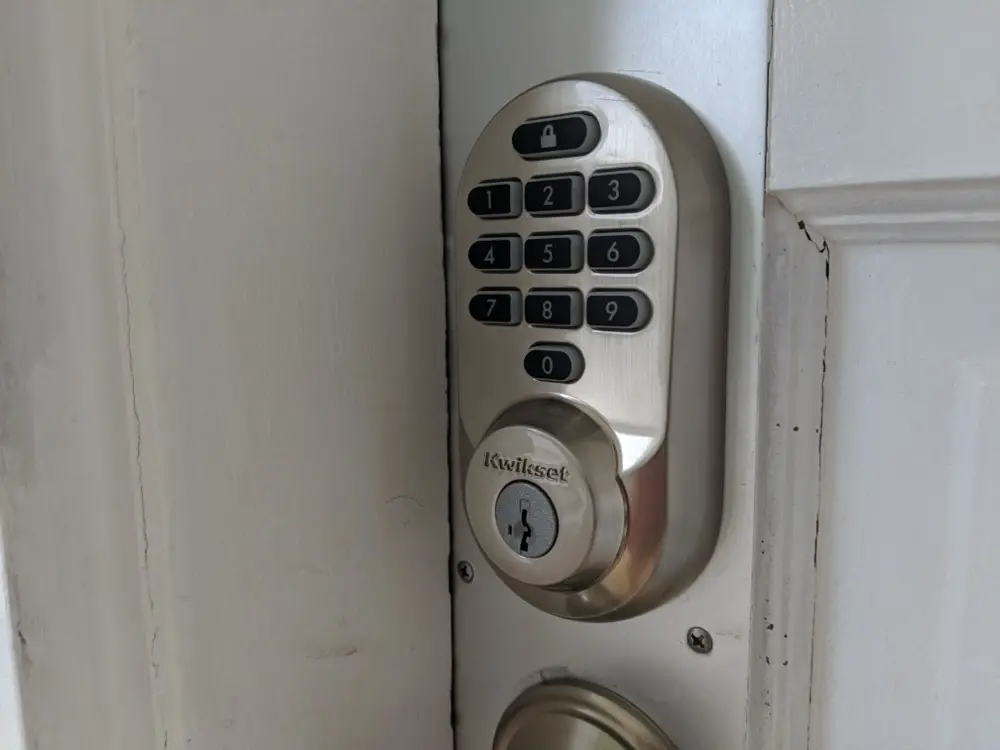
 

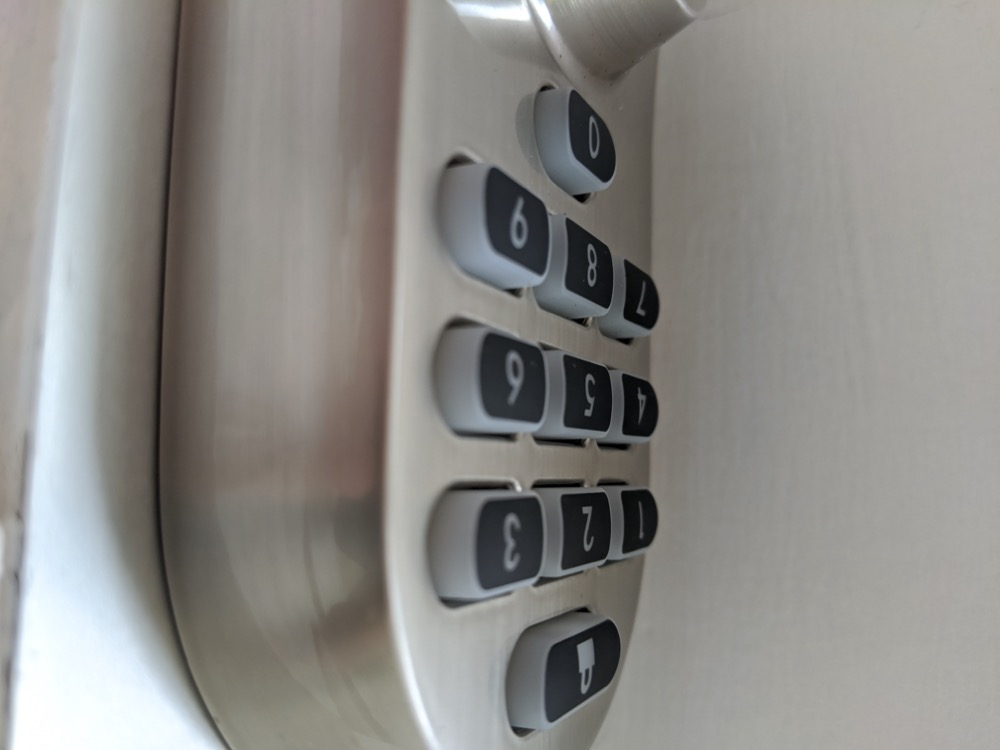
The Kwikset Halo features a few different design and finish options to match the style of your home. Personally I opted to test the "Traditional" model in Satin Nickel which features a more rounded design and physical rubberized buttons, it also comes in a Venetian Bronze finish. Many are probably going to prefer the look of the "Contemporary," which as you might guess, has a more modern look with a touchpad that lights up to allow you to enter your passcode and comes in Polished Chrome or Iron Black color options. 

Both designs feature a standard keyed lock as well to ensure that you never get locked out of the house due to a dead battery or other potential smart lock malfunction. This includes Kwikset's SmartKey Security technology which allows you to re-key the lock yourself so if you are installing two of these locks or have an existing Kwikset lock in your home you can easily get them all set to the same key.

The interior section of the lock is identical (color matched obviously) regardless of which design you select, it's about 1.2-inches deep in order to accommodate the four AA batteries that power it, making it more prominent than a standard lock. The battery section, pairing, and reset buttons are located underneath an opaque black plastic shell on the interior section. Otherwise, it's simply the turn piece used to manually lock or unlock the deadbolt and a status LED that will inform you when the door is being locked, unlocked, or if the batteries need to be changed.

Overall I don't find that the size or look of the lock bothers me and ultimately I'm more concerned about the utility of the lock, but obviously this comes down to personal preference.

Unless your original deadbolt was designed to keep out invaders in the middle ages, the Kwikset Halo is likely going to be a bit larger than your old deadbolt or other competing smart locks, but typically those don't include Wi-Fi and/or have reduced battery life when compared to the Kwikset Halo. The Kwikset Halo is also one tough lock, it's designed to withstand all of the typical lock picking, kicking or crowbar style entry efforts along with 20 minutes of fire resistance. And since this is a smart lock, it's also hardened against digital lock picking efforts via Wi-Fi or Bluetooth as well.  

Kwikset Halo Setup
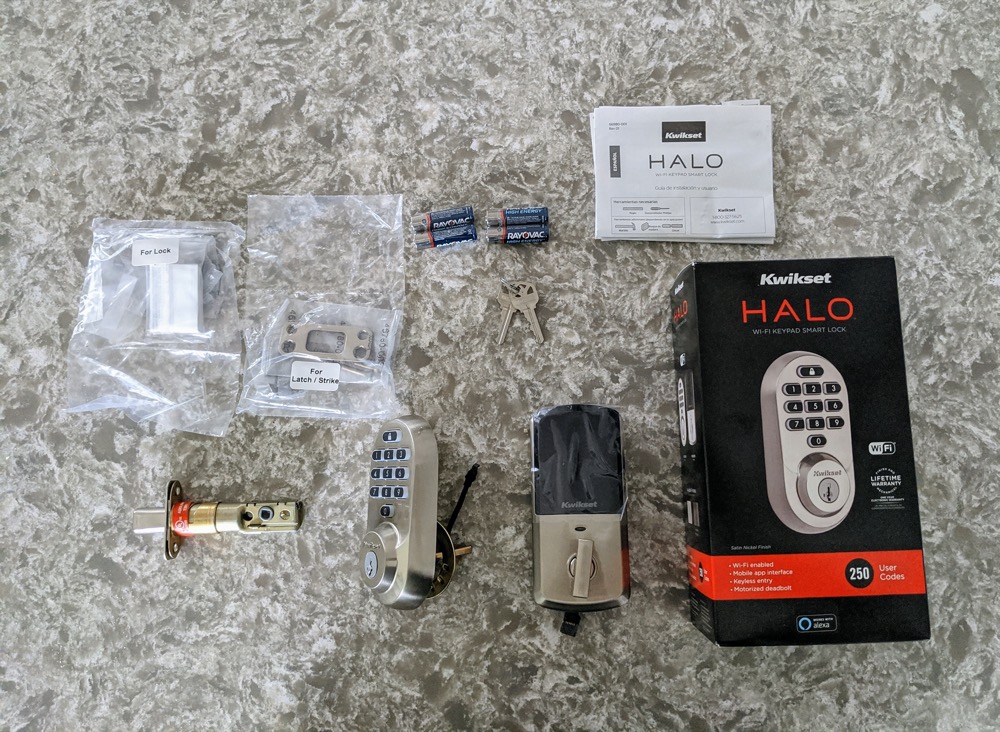
Installing the Kwikset Halo is, for the most part, identical to installing any new deadbolt lock. If you are installing it in an existing door, as I was, you will want to confirm that it is compatible with your current setup. Essentially you need to have the most common setup for an exterior door, which is a separate deadbolt and handle. You can take a quick look at the installation instructions on the Kwikset site if you want to confirm for yourself, but the app does a better job of walking you through the installation step-by-step once you have the lock and are ready to install it.

The entire process of removing my old lock and installing the Kwikset Halo, including setting up the app, took about 30 minutes. However, if you haven't installed a deadbolt previously or need to make adjustments to the door or door frame for the lock this could certainly take another 30 minutes to an hour.

And to support that fact, I made one mistake when first installing the Kwikset Halo. I failing to properly adjust my strike plate for a completely smooth movement when locking and unlocking the door. With a standard deadbolt, this wouldn't really be noticeable, you would just exert slightly more pressure when locking it, but you will dramatically reduce the battery life of the Kwikset Halo if it needs to use added force to lock the door. The measurements are all there in the instructions and after getting the occasional "jammed" message in the app for the first week I finally took the time (about 5 more minutes) to adjust the strike plate and it has been working perfectly ever since.

Kwikset Halo Battery Life

The Kwikset Halo is powered by four AA batteries, which are included in the box with the lock. According to Kwikset, most users should get 6 months on a single charge, averaging ten entries and exits per day.

After about a month of testing the lock I believe it will probably fall a little short of that mark for most users. Due to the error that I made with the initial installation and my elevated level of usage given that I was repeatedly testing all of the features of the lock it's difficult to infer too much from the battery usage that I saw. I have just recently replaced the batteries to start fresh and will update this review with my long term findings regarding battery life in another month or so now that the installation is done right and I have settled into a more standard and consistent usage pattern.

Kwikset Halo App
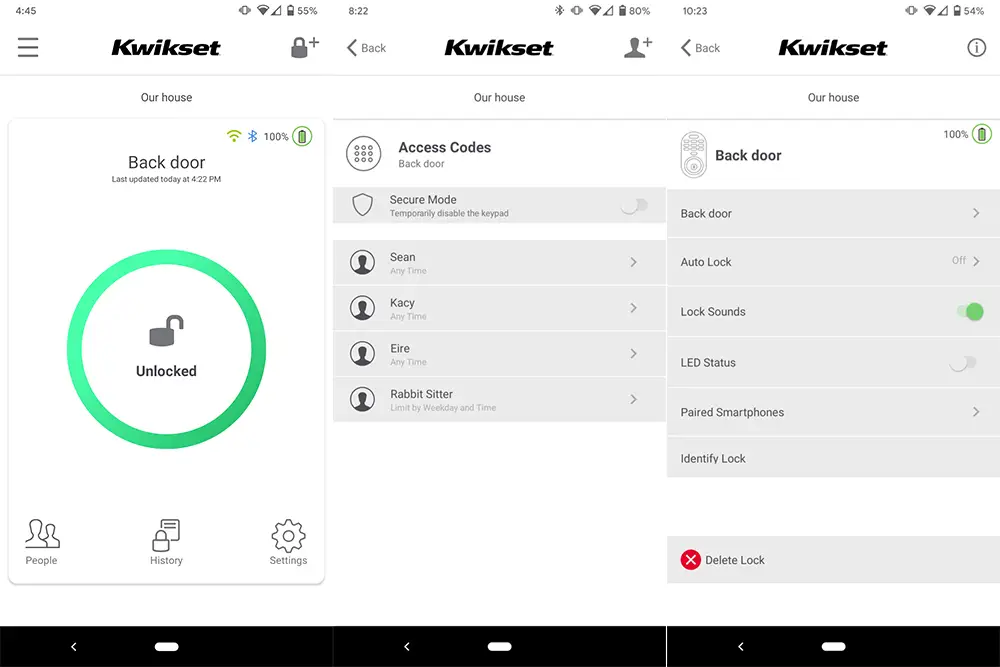
The Kwikset app has a simple and clean design that provides you with all of the basic information you want at a glance. That being said, it also offers quite a few features to delve into depending on your preferences.

The primary screen for the app gives you all of the pertinent information regarding the current status of your lock with a large "locked" or "unlocked" message at the center with a red or green circle around it respectively for added clarity. It will also show your connectivity status with the lock with the Wi-Fi and Bluetooth logos at the top-right corner along with the current battery life of the lock. Tapping the lock status at the center of the screen will cause it to lock or unlock.

Across the bottom of the app you will see "People," "History," and "Settings." 

People is where you will set up new users or make changes to users' access codes. You can also set a schedule for each individual to identify a specific set of dates, days, or times that the access code will be active. This works great if you have an electrician, pet sitter, or whoever that needs access to your house during a specific window. Naturally, it's easy enough to delete or disable an access code too, but this way you don't need to think about that. You can also turn on Secure Mode from this screen which will temporarily disable the keypad completely, meaning only someone with access to the app or the physical key would be able to unlock the door.
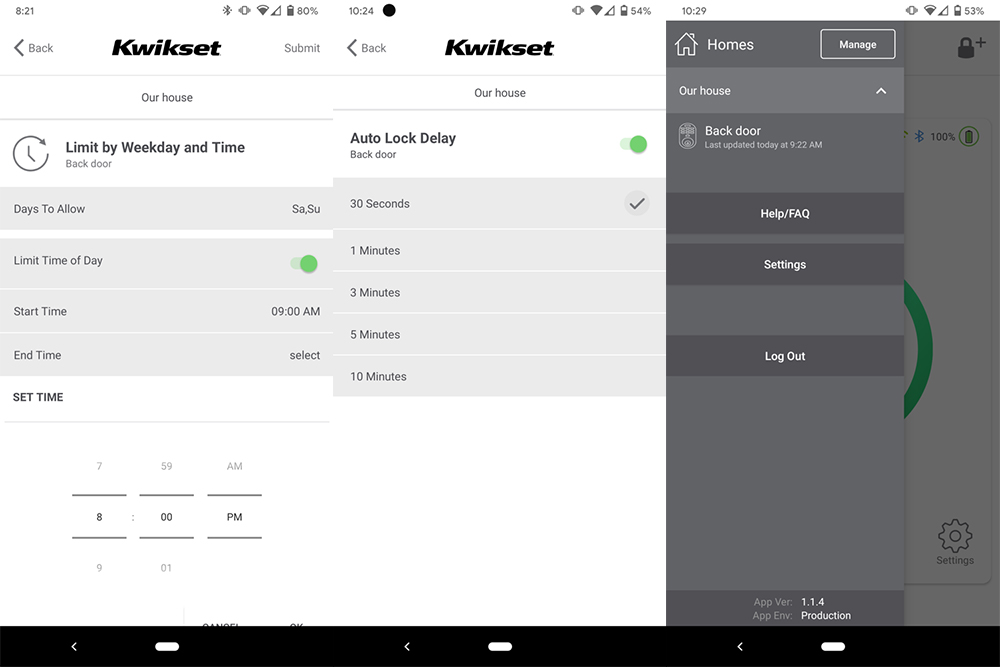
History gives you the time and date of every time the lock is used whether that is someone using the turn piece to lock or unlock it or if they use their access code it will display the name associated with that code. 

Settings will display a list of your locks with the options for each one. Most of them are pretty self-explanatory, Auto Lock allows you to have your lock wait for a set period of time, from 30 seconds to 10 minutes, after you unlock your door to enter or exit your home and then automatically locks the door.

Finally, the hamburger menu in the upper-left corner allows you to manage additional locks or homes, I wasn't able to test this as I just have the single lock, but it's certainly convenient that this is all easily manageable without jumping through too many screens in the app.

Kwikset Halo Pricing
The Kwikset Halo has a retail price of $199 for the Traditional model that I tested or $229 for the Contemporary touchscreen version. However, you can find deals for it on a regular basis, at the time of publication the Traditional model was available for less than $150 on Amazon and the Contemporary was $175.

While you can obviously find a standard deadbolt for less than $40 and a simple electronic deadbolt for less than $75, the value in the Kwikset Halo is in the connectivity which can provide you with added security and peace of mind. 

Viewed strictly against other smart locks the pricing on the Kwikset Halo is quite reasonable, the equivalent model from Schlage, the Encode is actually slightly more expensive at $249 as is the 4th Generation August lock which integrates into your existing deadbolt.

Overall, I think the Kwikset Halo is a solid value, particularly at its current pricing.

Final thoughts

Overall, I was thrilled with my experience with the Kwikset Halo.  It does a nice job of easing you into the smart lock world with the ability to use it as a traditional deadbolt when you need or want to, while offering all of the smarts I could want out of it as well. Setting up accounts for my entire family was quick and easy and the app makes it simple to monitor the status of your lock.

We had a pet sitter for our rabbit while we were away for a weekend and I was able to easily see when she arrived to feed and check on the bunny and then verify that the door was locked after she had departed. Not having to hand someone a key, worry about them actually locking the door, or then getting the key back later was fantastic. 

While the initial investment is roughly three to four times the cost of a traditional deadbolt, this lock should last for years, and for the convenience and peace of mind it delivers, I think it is absolutely worth the price of admission.


from Phandroid https://ift.tt/2OeX2Y5
via IFTTT

First 10 things every Samsung Galaxy S20 user should do

The Samsung Galaxy S20 lineup comes in three variations, with many of us settling with either the standard S20 or the S20 Plus. But if you just picked up your S20, you'll want to know where to get started. Well, we've got you covered and here are the first things every Samsung Galaxy S20 user should do.

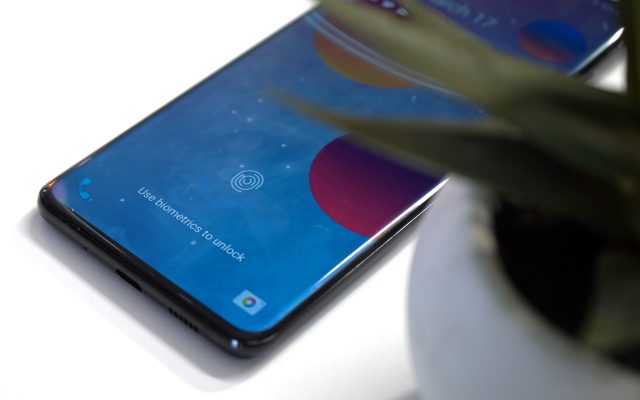
Lock your phone with biometric security

The great thing about many smartphones in 2020 is that there are multiple ways to keep your device locked so it remains private to you. With the Galaxy S20 lineup, there are a few ways to do this, including the ultrasonic fingerprint scanner along with the less-secure iris scanning. If you bypassed this during the initial set up, then here's how you can set up the Biometrics on your S20:

  1. Open the Settings app.
  2. Scroll down and select Biometrics and security.
  3. Tap Face Recognition.
  4. Follow the steps and save.
  5. Go back to the main page.
  6. Tap Fingerprints.
  7. Follow the steps and save.

One thing to make note of, and this has been true for many devices, you might want to register your fingerprint multiple times. This helps to improve the overall accuracy, and of course, adding your thumbprint from both your dominant and non-dominant hands will make it easier to unlock in a jiffy.

Take advantage of the new gestures (or go old school)

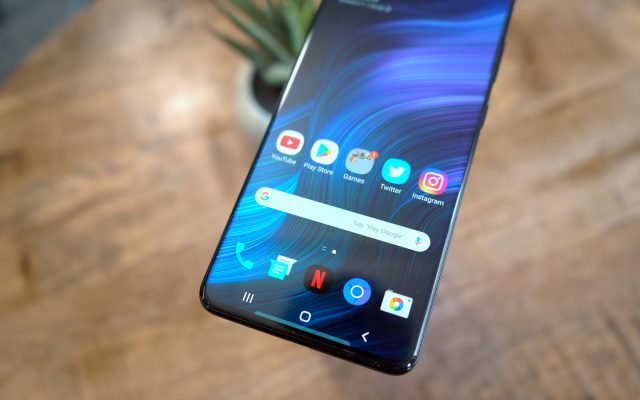
Now that screen real-estate is more important than ever with these big and beautiful displays, you may not want to have a portion of the screen taken up by the old-school navigation bar. Samsung has implemented gestures across the board in order for you to quickly navigate around your Galaxy S20 without tapping buttons. Here's how you can get that set up:

  1. Open the Settings app.
  2. Tap on Display.
  3. Scroll down and select Navigation bar.
  4. Tap the icon next to Full-screen gestures.
  5. Change Button order, if you desire.

There is one disappointing aspect of the new gestures, as Samsung has not enabled them to be compatible with third-party launchers. So Nova or Lawnchair users will be able to activate them, but not all of the options will be available and the experience is less-than-great. But if you're okay with using Samsung's launcher, this won't matter as much.

Switch to Dark Mode to save battery life

Nobody wants to wake up early in the morning, unlock their phone, and get blinded by a bunch of bright and white screens everywhere. Dark Mode is available on the S20 and you can even set a schedule if you don't want it enabled all of the time.

  1. Open the Settings app.
  2. Tap on Display.
  3. Tap Dark on the right-hand side.
  4. Select Dark mode settings

Diving deeper into the Dark Mode Settings, you'll find the ability to turn this on according to a specific schedule, or just from sunset to sunrise. However, you will be prompted to grant location data in order for your phone to know when it's time to activate Dark Mode. You can also have this applied to your wallpaper, along with the ability to enable the Blue Light filter (Adaptive Color Filter) automatically between sunrise and sunset. Your eyes will definitely thank you for this.

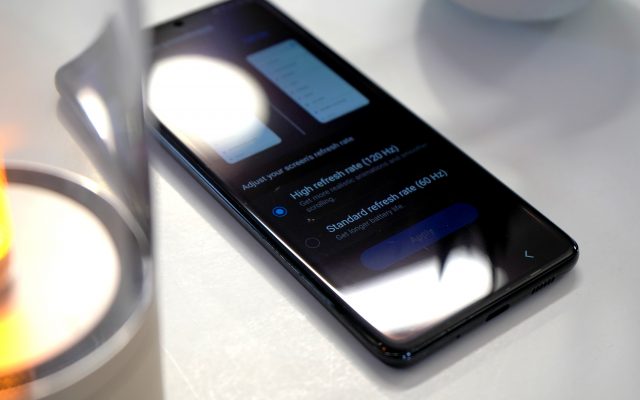
Turn on 120Hz refresh rate

One of the key features of the S20 isn't the new Snapdragon processor or the increased amount of RAM. Nope, it's all about the display and with the S20 you can enable the refresh rate to go up to 120Hz. The S20 comes with two refresh rates available, giving users the option to go between either 60Hz (what you are used to) and 120Hz.

  1. Open the Settings app.
  2. Tap on Display.
  3. Select Motion smoothness.
  4. Tap High refresh rate (120Hz)
  5. Tap Apply.

The settings panel for adjusting the refresh rate gives you an example of the difference that will be applied if you choose 60Hz or 120Hz. The only catch here is that you won't be able to take advantage of the WQHD+ (3200 x 1440) offered by the S20. Instead, if 120Hz is enabled, your phone will be "locked" to FHD+ (2400 x 1800). It makes sense to do this as having the highest display resolution paired with the fastest refresh rate will mean the shortest battery life you've ever experienced.

Accessorize your S20

Accessories are a fun part of getting a new device, regardless of whether it's a phone, tablet, or new PC. We have rounded up some of our favorite accessories that will pair perfectly with your S20 and give you a more enjoyable experience.

Turn off Bixby for good

Bixby has been a source of frustration for just about anyone who has used it over the years. While the experience itself is seamless, as it's integrated directly into your phone's software, Bixby just doesn't work as well for a smart assistant when compared to Google Assistant or even Siri. Nonetheless, Samsung continues to try to push it on users, including owners of the Galaxy S20. Here's how you can disable Bixby on your S20:

Disable the Bixby Button: 

The first method we will explain to disable Bixby is through the disabling Bixby button. Starting last year, Samsung has merged its Power button and Bixby button, making it one that is present below the volume key. Therefore, it is really easy to turn off Bixby. 

Steps to disable Bixby button are: 

  • From your home screen, move the notification bar down. 
  • In the next step from the quick settings, panel click on the Power Menu button
  • Once the power menu opens, look for the side key settings and tab on it. Or you can either hold the side key of the device to open side key settings.
  • Power off the menu under the press-and-hold option by toggling it on. This can be done by making changes in the double press settings. Therefore, by holding the power button longer, it can lead to Quick Camera launch or open app
  • If you have selected an open app, press the cog button to choose an app that can open with a double press. 

Disable Bixby Routines: 

The last method we will explain involves the disabling of Bixby routines. Disabling Bixby routines can completely turn off the Bixby in Samsung. It is clear that once Bixby is a turnoff, its features won't work anyway. 

Its steps include:

  • Scroll down the notification bar from the home screen. 
  • Then click on Gear Icon.  
  • In the settings, please search for the Advance Features and tap on it. 
  • Move down to search for the Bixby routines and disable it from there.

Enable Always On Display to always show your notifications

The Always On Display is both great and not-so-great, depending on how much battery you need to last you throughout the day. But it's still a better option than your phone lighting up every, single, time a notification hits your phone. And in true Samsung fashion, you can customize and set this up to your liking from top to bottom. Here's how to get started.

  1. Open the Settings app.
  2. Tap Lock screen.
  3. Tap Always On Display.

Before even enabling the Always On Display, there is a slew of options for you to go through and customize so that your AOD looks exactly how you want it to.

  • Tap to show – Show AOD for 10 seconds.
  • Show always
  • Show as scheduled – Set a schedule of when to show AOD.
  • Clock style – Customize the clock that is shown, along with the color theme of the clock.
  • Show music information – Shows details of the music playing when the FaceWidgets music controller is active.
  • Rotate screen to – Switch between Portrait or Landscape mode when viewing AOD.
  • Auto brightness

Take better pictures than ever before

Gone are the days of needing a dedicated point-and-shoot or DSLR camera to get the best pictures. Samsung's camera system is one of the best on the market, and with your Galaxy S20, you can customize the app to your liking.

  1. Open the Camera app.
  2. Tap the Gear icon in the top left-hand corner.

From the Camera Settings, you will find a slew of options to pick and choose from. This lets you keep the features you want while getting rid of the features you could care less about.

  • Intelligent features
    • Scene optimizer
    • Shot suggestions
    • Smart selfie angle
    • Scan QR codes
  • Pictures
    • Swipe Shutter button to edge to
    • Save options
  • Videos
    • Rear video size
    • Front video size
    • Advanced recording options
    • Video stabilization
  • Useful features
    • Auto HDR
    • Selfie tone
    • Tracking auto-focus
    • Pictures as previewed
    • Grid lines
    • Location tags
    • Location tags
    • Shooting methods
    • Shutter sound

Control your S20 from your Windows PC

Usually, you have to worry about a lot of useless bloatware being pre-installed on your smartphones. But there's one piece of software that is rather useful, provided that you use a Windows PC. Link to Windows is a new integration for Samsung handsets and allows you to view notifications, reply to messages, and even control your smartphone's audio. Here's how to get it set up.

  1. Open the Settings app.
  2. Scroll down and select Advanced features.
  3. Tap Link to Windows.
  4. Follow the instructions.

You will need to be at your PC in order to finish the installation, as you need to confirm the pairing between your S20 and your computer.

Check out even more on the Galaxy S20

The Galaxy S20 continues to turn heads and will be a fan-favorite for at least the next year or two, until something better comes along. Can't get enough of the S20 and what it's capable of? Then check out Phandroid's other coverage of Samsung's early-2020 flagship.


from Phandroid https://ift.tt/3fgmyIp
via IFTTT