Monday, January 27, 2020

Amazon Echo Buds see their first major sale, and it’s a big one

The Amazon Echo Buds were the companies first go at making earbuds. These true wireless earbuds were, for the most part, fairly regular earbuds, just with the benefit of Amazon Alexa built in.

Thanks to the digital assistant you can ask Alexa to play music, set timers, and pretty much anything else Alexa is capable of on an Echo. The earbuds have full access to thousands of skills. And even better, when you don't want your mics on all the time, you can shut them off in the Alexa app.

Other than that you get is dual drivers, a decent five hours of battery life, twenty hours of battery life in the case, both active noise cancelling and a passthrough mode with the Bose name on it, and a very average design. Complaints of short battery life and bugs here and there have made reviews less than glowing but they're a solid pick, especially with ANC.

At their normal price of $129.99 they're a bit hard to recommend. Competition in this segment is hot and a few improvements are in order. But Amazon has dropped the price of the Echo Buds for the first time and it's by a whopping 31%. At $89.99, they're much easier to recommend. It's a cheap way to get into true wireless earbuds with ANC and if you're a fan of Alexa, you can't go wrong with these.

Buy on Amazon


from Phandroid https://ift.tt/2RTXzA8
via IFTTT

Motorola Razr’s display might come with “bumps and lumps”, but that’s OK

Following a brief delay, Motorola's Razr foldable phone is now available for pre-order. This is good news for those who are looking to get their hands on a twist on the foldable phone concept, although we're sure that with the debacle with the Samsung Galaxy Fold, there are some who might be a bit skeptical about the Razr and its durability.

Motorola seems to understand this and has since published a video titled "Caring for Razr". In this video, the company attempts to reassure would-be customers that any "bumps and lumps" that they might see in the phone's display are apparently normal. This is expected to happen the more users use their phones.

It is the side-effect of the way flexible displays are currently made, and should not be taken as a sign of defect or that their device is broken. The company also claims that the Razr has been engineered with a more durable hinge that allows for a bit more "give" in terms of its flexibility and durability.

This does not mean that the phone has been built to be a rugged device. The video also highlights some of the preventive measures that users can take to ensure their device lasts as long as possible. The handset is currently up for pre-order where it is priced at $1,500.


from Phandroid https://ift.tt/2vqF12R
via IFTTT

Samsung might launch two foldable smartphones this year

Samsung will be hosting an event on the 11th of February, 2020. The event is largely expected to see Samsung launch their new Galaxy S20 smartphones, and if the rumors are true, it could also see the launch of a new foldable smartphone which has been referred to as the Galaxy Z Flip.

Now according to a tweet by XDA's Max Weinbach, he has heard from his sources that Samsung will not only launch one foldable phone, but two foldable phones this year.

For those who are unfamiliar, the Galaxy Z Flip will be similar in design to Motorola Razr's foldable flip phone. It will sport a clamshell-like design with a foldable display in the middle of it, putting a twist to a classic feature phone design. The second foldable phone has been rumored to be the successor to last year's Galaxy Fold.

This is a smartphone that can be unfolded into a tablet form factor, and folded back again to a smartphone. In addition to being foldable, Weinbach's source also tells him that it could sport an 8-inch display, a 108MP camera (similar to the upcoming Galaxy S20), the use of Qualcomm's Snapdragon 865 chipset, 5G connectivity, and interestingly enough, an S Pen.

Needless to say that this should be taken with a grain of salt, but hopefully we'll have more details about it at Samsung's upcoming Galaxy Unpacked event.


from Phandroid https://ift.tt/2uAcSG3
via IFTTT

Friday, January 24, 2020

Nexus 6P settlement payments of up to $400 will be made by March 11th

Nexus 6P owners that put in a claim last year should finally be getting their money in the next couple of months according to the latest status report from the court in the class-action lawsuit. For some that could mean up to $400, depending on the nature and resolution of the issues for the malfunctioning Nexus 6P.

For those that skipped the Nexus 6P, it had a number of fairly showstopping bugs including a boot loop issue and random shutdowns. My own Nexus 6p was one of the faulty units so I got to enjoy the frustration first hand.

If you did put in a claim and the documentation was found to be insufficient, you should expect to be contacted and given the opportunity to correct the problem in order to still receive what you are owed.

Originally the payments were to be made by mid-February, but the latest update places the deadline for the distribution of all settlement payments as March 11th.

This certainly isn't the way Google or loyal fans would probably like to remember the Nexus program, but $400 might be exactly enough to pick yourself up a shiny new Pixel 4a this spring.

Source: Court Listener


from Phandroid https://ift.tt/2tNpTMt
via IFTTT

5 awesome Android games to check out this week (JAN 24, 2020)

The Google Play store is full of awesome apps that can help you with tasks or simply help you take a break and relax with an engaging game. But how do you know what ones you should try? We can help you with that! Every week, we will share awesome new apps that we think you will enjoy. The highlights from this week include a shark looking to slam into anything it and a 1945-style arcade shooter.

Take a look at the list below to find the perfect new game for you this week.

Age of Civilizations II Europe

Description: Age of Civilizations II Europe is a strategy game traversing across the ages of history and beyond. Your goal is to take your civilization into the future and leave your mark. Are you going to use military prowess and diplomacy to bring the world together or under your authority? Use the in-game editor to create past historical events or your own alternate historical scenario.

  • Price: $2,99
  • In-app Purchases: No
  • Rating: 4.2/5
  • Installs: 100+

Install Age of Civilizations II Europe 

Burning Sky: Aircraft Combat 2020

Description: Burning Sky is another top-down arcade shooter similar to the classic arcade game 1945. Move through the various stages collecting gases to improve your aircraft with new abilities. The colorful artistic style used is nice and greatly enhances the look of the game. Check Burning Sky out if you are a fan of top-down arcade shooter games.

  • Price: Free
  • In-app Purchases: Yes
  • Rating: 4.7/5
  • Installs: 100+

Install Burning Sky: Aircraft Combat 2020

Icy Drift

Description: Simple controls yet challenging levels for players who love games with a whacky twist! Master the touch joystick with drifting physics to avoid obstacles and yet collect rewards along the way! Play as a curious animal exploring the dangerous plains of Antarctica! Progress Classic Mode by reaching the end flag of each level! Earn coins to unlock more characters and accessories as well!

  • Price: Free
  • In-app Purchases: Yes
  • Rating: New
  • Installs: 100+

Install Icy Drift

Sharkslam

Description: Your goal in Sharkslam is to leap out of the water and slam into as many objects as you can. Attack other objects such as birds and other sharks in an effort to steal their points. Play in 3 exciting modes: Brawl, Time Attack, and Survival! Collect objects as you progress to customize the look of your shark. Hats, accessories, and backgrounds are available to unlock as you progress through the game.

  • Price: Free
  • In-app Purchases: Yes
  • Rating: New
  • Installs: 100+

Install Sharkslam

War Tortoise 2

Description: War Tortoise 2 is the sequel to the popular Idle shooter. Your role is to take your heavy tank, War Tortoise, and explore conquer nearby lands. Along the way, discover loot to upgrade your tank with improved armor and weapons. Choose from a wide variety of characters to pilot your tank, each with their own unique skills.

  • Price: Free
  • In-app Purchases: Yes
  • Rating: Early Access
  • Installs: 1,000+

Install War Tortoise 2  


from Phandroid https://ift.tt/2sYE3tQ
via IFTTT

5 Popular Apps that Positively Affect Student Learning

Technological developments have impacted many different sectors as far as AI and Machine Learning is concerned. The educational industry wasn't secluded in this technological revolution and there are apps that promote student learning. They cater to different age groups and some of them are powered by the popular AI technology. 

These apps have improved the way students receive instruction and are very effective in doing so. Teachers have adopted their use in classrooms and the results have been amazing. What are these apps? 

Here are 5 of the best educational apps that positively affect student learning.

Image by Freepik

Seesaw

Seesaw is one of the best educational apps that includes parents in their students' learning. The app sends important updated and messages to parents about their students learning and progression. 

That will promote learning because when parents recognize that their children are doing, they will encourage them and that will motivate them. Some parents are usually busy even for an open night with the teacher of their children and this app bridges that gap. 

Through direct communication with the teacher, parents can know exactly how their child is doing. The communication link is very private and discreet because you can only view your child's work. When helping your child develop and grow, at some point, you might realize you need term paper writing service. Online writers can help you in such a scenario perfectly.  

Kahoot

Kahoot is also on the list of the best learning apps that you can use on mobile devices and desktop. If you are choosing the right apps for the development of your child, choosing this one is a great decision. It is a game-based learning app that helps students learn through fun and engaging games. 

It is widely being used in certain schools and educational institutions all around the world to teach younger children. In 2017, this app had about 50 million users that were active monthly. 

You don't have to register to use this app to partake in quizzes but to create them, you need to be registered. It has multiple choice quizzes that can be accessed using the mobile app or through a web browser on any device with an internet connection.

Google Classroom 

Google Classroom is a top educational app that can be used by teachers to streamline all of their tasks in one tool. They can manage the coursework that they are handling and see what else is left to do. Teachers also can distribute assignments and other school work using this platform. The best part is that they can also grade them and send feedback. Basically, it is a virtual classroom, but it doesn't only benefit teachers only but also students. 

They can log in from anywhere at any time and get to see the assignments due. With this system, no one can blame the teacher for not hearing her scream the due date for the work. 

Also, students can get genuine feedback from their teachers and since it will be noted down, they can get to improve on those points. And if you feel that you are struggling with assignments and not able to come up with quality writing work, use Edubirdie. The writers there can handle the writing work for you and deliver it in a quick time. 

Image by Freepik

Classdojo

Classdojo also falls under the list of top learning apps that connect students and their parents. It is currently being used in 95% of the schools in the U.S and helps students with the task of relating how their day at school was. 

Using this app, teachers can offer students encouragement on improving on certain matters or skills. Students can also share their learning experience and showcase their achievements by adding pictures of their class in their portfolio. 

Parents can live the moment by viewing those pictures and their children's portfolios and get to keep up with their students' learning. Another interesting feature of ClassDojo is that it translates messages to more than 30 languages. Teachers can also group students randomly using their ClassDojo Toolkit for group projects.

Edmodo

Edmodo is another app that streamlines the activities of running a classroom efficiently and makes the material accessible to students. It saves the time of teachers and benefits students receive more time getting instruction from them. 

On the other hand, this digital platform makes a student more confident and learn what it means to be part of the digital world. Parents also receive timely updates from the teachers and that helps lay a basis for what they need to teach at home. 

The bottom line

These apps make studying for students easier by unburdening teachers from extensive admin work and tracking the coursework. Also, students can improve when parents know exactly what is going on at school, that will help them understand where they need to focus more when supporting their children. 

Downloading these apps and implementing them in the classroom will positively affect students. Some of these apps also promote students learning to be digital citizens. Game-based learning is also a very effective way of engaging students to be able to understand some of the concepts they need to grasp easier. Technology has really revolutionized learning and only time will tell what it holds for this industry.

Author Bio:

Robert Everett is an education expert and an academic writer who has experience of over a decade in this field. His assignment writing skills are unmatchable and that makes him one of the popular choices for the students needing writing help. In his free time, he likes to play video games, review new apps and software on his blog and go for jogging. Find him on Twitter.


from Phandroid https://ift.tt/37p3Avh
via IFTTT

ZTE Blade 10 Prime review: Impressive option below $200

Like a lot of us, I have a tendency to focus on the high end of the smartphone market, but keeping our best budget smartphones and best budget flagship smartphone lists up-to-date in 2019 helped change that for me.

As I am quick to point out on both of those lists, the quality of smartphone that you can get for less than $400 or even $200 is pretty amazing. ZTE is one of the perennial contenders in this arena and puts out a number of compelling options across these price points. The ZTE Blade 10 Prime was released late last year and at just $179 on Visible Wireless it should fit into virtually any budget.

The dual-cameras on the back of the phone, large 6.3-inch screen, and minimal bezels are an interesting option at this price point. I've spent the last several weeks with the ZTE Blade 10 Prime to see how close it can get to replacing the $800+ ($1,000+ in a lot of cases now) smartphones that I'm accustomed to.

DISPLAY

  • 6.3-inch 1080 x 2280 FHD+ IPS LCD

I was completely blown away by the quality of the display on the Blade 10 when I powered it on for the first time. It may not be 4K, but the FHD+ resolution holds up really well at this size, the image is incredibly bright and sharp. Colors are a little over-saturated, but not considerably more so than most Android devices. It obviously can't match a high-end AMOLED, but when you aren't holding it side-by-side with one (which I'm going to assume you aren't usually doing) it absolutely does not disappoint.

DESIGN
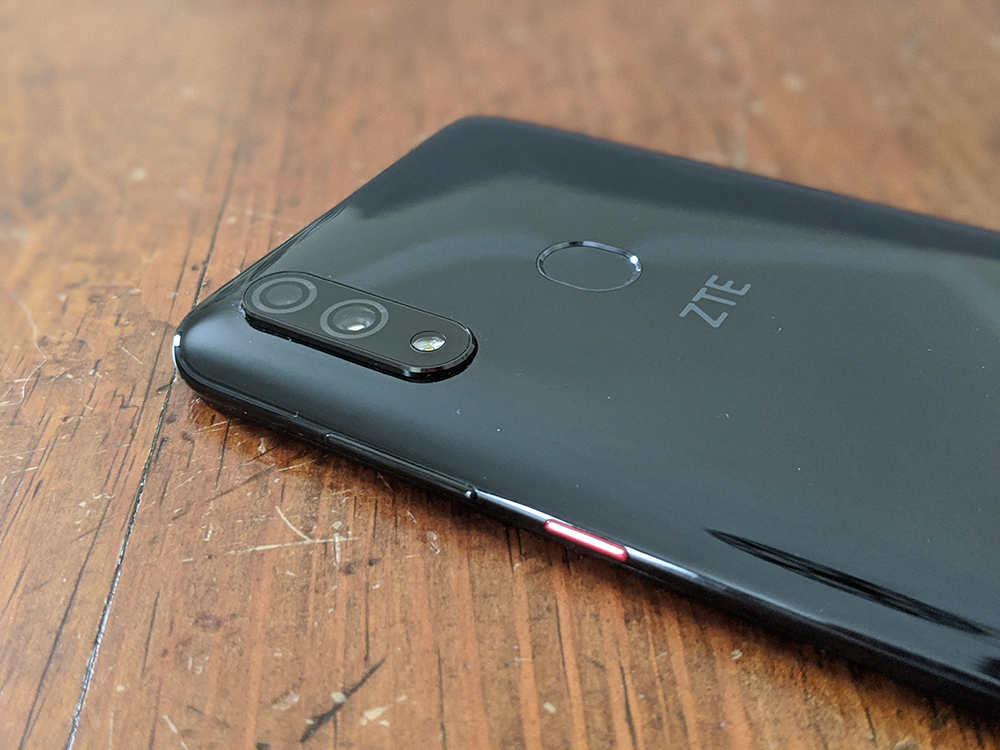
If you are a smartphone design snob, the ZTE Blade 10 Prime is probably not the best option for you. There is absolutely nothing wrong with the overall design, but nothing about it stands out either. The red power button is the lone splotch of color on the otherwise black slab.

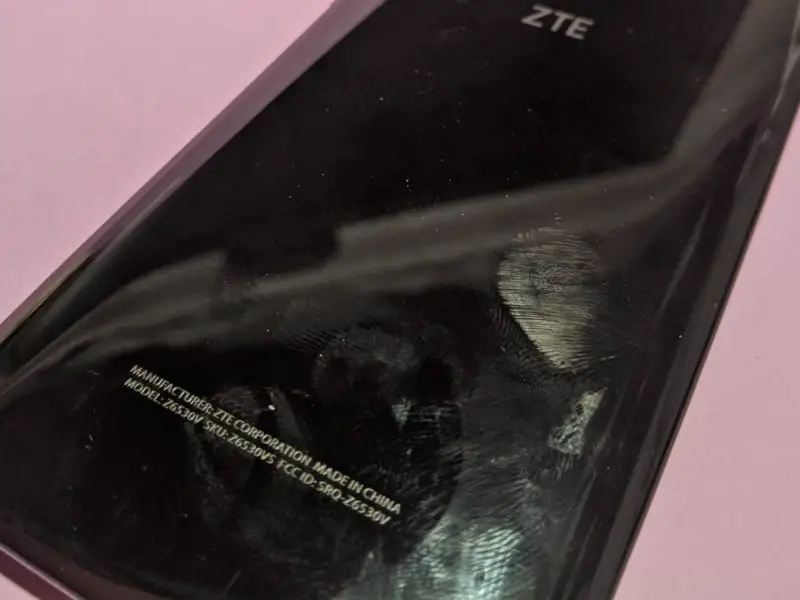
The back of the device is a glossy fingerprint magnet with a fingerprint reader and a dual-camera with a flash the only things breaking up your streaky fingerprints. The fingerprint reader is a fairly deeply recessed elongated oval, which, if you have larger fingers, makes for a less comfortable feel than the circular reader of my Pixel 3.
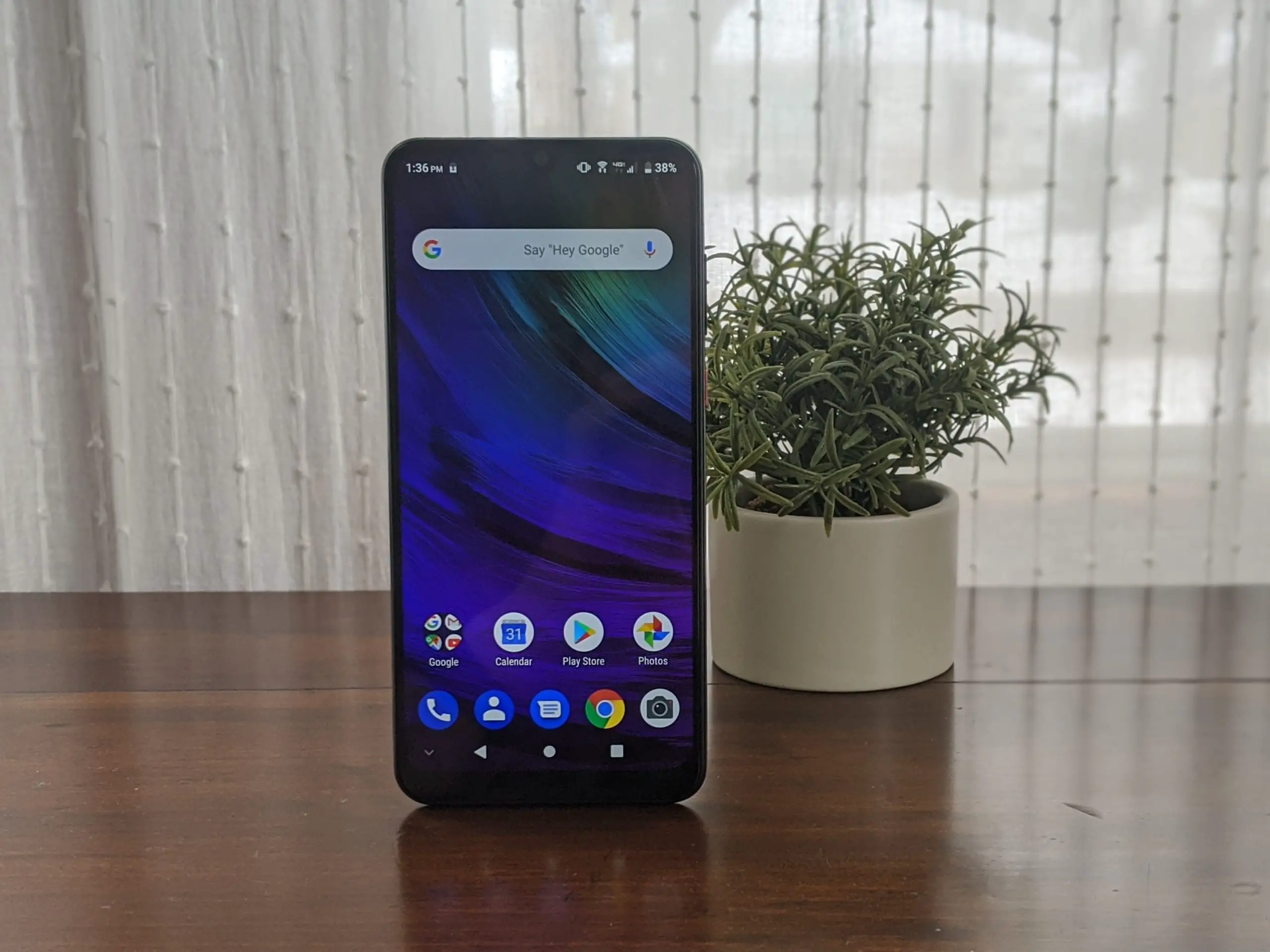
One notable feature around the front of the device is an LED notification light near the top-left corner. Unfortunately, it's only capable of red and green which would have been nice to customize for specific notifications. You do have a handful of options regarding what triggers the light, but it would have been nice to get more granular with it.

The body of the Blade 10 is entirely plastic, making it extremely lightweight and thin. I think there are two schools of thought on this: one is that it makes it feel cheap and the other is "who cares light is good." Personally, I'm a fan of cases, so I would absolutely get a case for this device just to give it a little more heft and as an added bonus it should add a little more visual interest to it.

PERFORMANCE

  • MediaTek Helio P60 with 3GB of RAM

In general, I was really pleased with the performance on the Blade 10 Prime, which was honestly a bit of a surprise. Navigating the UI is fine and I didn't notice any egregious lag while swiping between screens or scrolling. I was able to complete standard tasks like email, viewing my photo library, and navigating with Google Maps without any appreciable slowdown.

My first real hiccup was when I opened the camera for the first time. From clicking the camera icon to taking a shot is approximately 3-4 seconds as opposed to 1 second on my Pixel 3 and slightly less than a second on my OPPO Reno 10x Zoom. For me, that's a killer as I use my camera constantly and have young kids that aren't going to wait for the camera to finish booting up. While there is a slightly longer launch time on other apps, nothing was close to as slow as the camera. Hopefully, they will be able to improve this in a future update.

Gaming was actually a pleasant surprise on the Blade 10 Prime as well. Now if you are a big PUBG Mobile or Fortnite fan you should look elsewhere, even at the lowest settings I found them to be virtually unplayable, but anything a bit less high paced should be fine. I played some Dream League Soccer and had no issues with frame rate or controls there and of course if you stick to more casual puzzle games you'll be just fine.

CAMERAS

  • Rear: 16MP f/1.8 wide-angle and 5MP standard f/2.0
  • Front: 16MP f/2.0

Now while I didn't have glowing things to say about my experience with booting up the camera, once it is up and running the output from the cameras on the Blade 10 Prime are actually quite good for a smartphone in this price range, just occasionally inconsistent. Unfortunately, mid-winter in Wisconsin doesn't offer up many bright sunny days, but you should be able to get a feel for the detail and overall quality from the Blade 10 Prime camera.

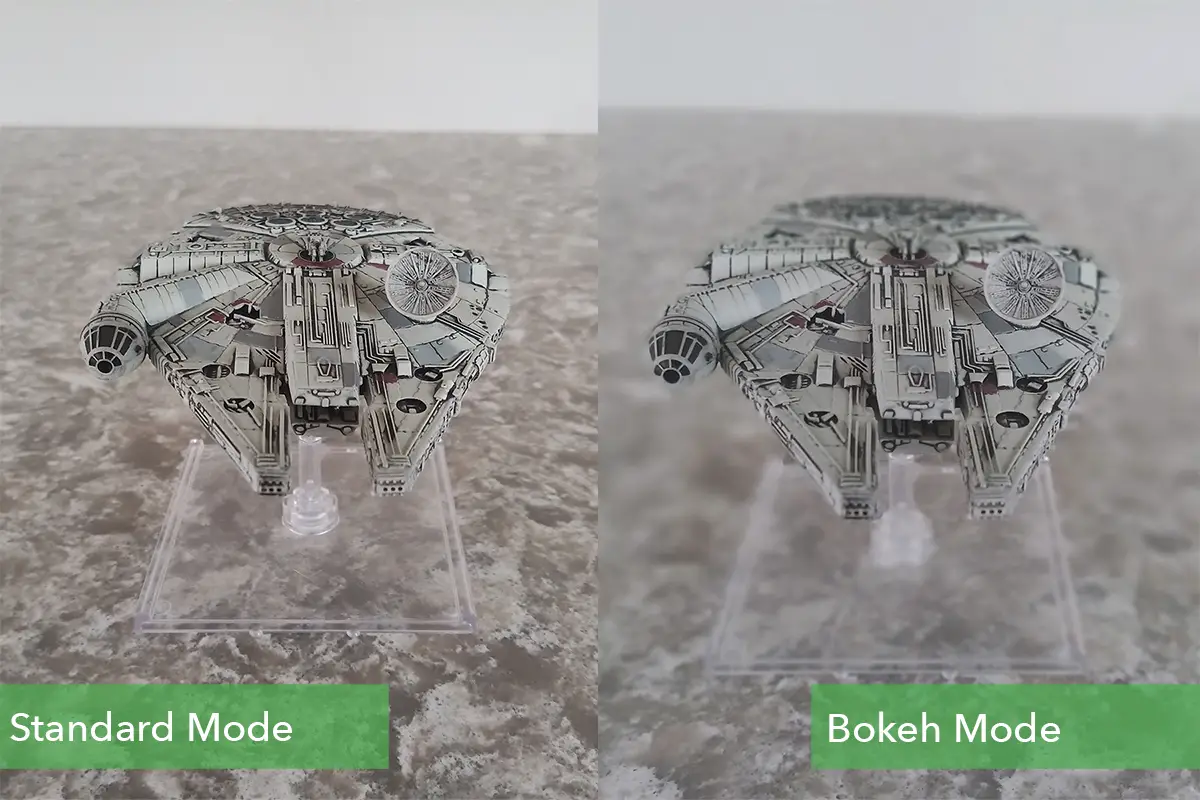
While it is impressive that ZTE gives you a dual-camera at this price point, I actually wouldn't recommend using it, at least with the current software. It's not giving you a zoom lens or wide-angle option, it's just there to assist the portrait mode and give you the fake bokeh effect, but in my testing, it was far too unreliable. You are sacrificing resolution and lens quality for the faux blur and it's not worth it, stick to the standard camera and you'll be happier with the results.
The Blade 10 Prime gave me very natural-looking results, which some people love, while others prefer the more warm and saturated look offered by the Pixels for example. If the latter describes you but you still are interested in the ZTE Blade 10 Prime then the solution is to just use Google Photos and hit auto and you'll end up with the look that you crave.

The front-facing camera offers the same 16MP as the primary rear camera and at a still reasonable f/2.0. Unsurprisingly the results were extremely similar to those from the rear camera. I'm not generally someone that snaps selfies, but the same caveats for the rear camera apply here. In my experience, it captured my skin tone correctly, but that's not always what people are shooting for.

The camera app doesn't have an abundance of modes or options like Huawei for example, there are just 6 options (Portrait, Manual, Panorama, Bokeh, Mono, and Timelapse).

I did have a bit of fun with Mono which isn't something I have on any of my other phones. The feature shifts everything to black and white and then allows you to select a single color to keep. You can either select it using the red/green/blue color sliders on screen or by dragging an eye-dropper over the item with the color you want to keep. Not something you are likely to be using all the time, but it worked well.

The shot below shows that inconsistency I was talking about earlier, this was shot mid-day and while it was an overcast and generally unpleasant day, the Blade 10 Prime is considerably darker with a grey cast to the whole image while the Pixel 3 is pushing a bit cool on this one but is much closer to what it actually looked like. With that said the detail in the Blade 10 Prime was still great here and if you don't mind doing a little editing it can be fixed quite easily in Google Photos or your photo app of choice.

SOFTWARE

  • Android 9 (Pie)

I don't really have anything to say here as ZTE has blessedly done essentially nothing to this phone as far as the operating system is concerned. There are a couple of minor visual tweaks here and there, but for the most part, everything looks like stock Android 9 Pie and hopefully, that means there's a chance of an Android 10 update in the future.

BATTERY

  • 3,100 mAh

Now if you are sticking to a sub-$200 smartphone because you are a casual user, the Blade 10 Prime won't have any problems getting you through the day. If however you are just being budget conscious and still make considerable use of your smartphone you should probably look to something like the [Motorola G7 Power](https://ift.tt/36jeW2h) or [ZTE's own Blade Max 2S](https://ift.tt/37qaoZn) which both offer over 4,000 mAh batteries that should get anyone through a day's use and beyond.

Now my standard daily driver is a 16-month old Pixel 3 and I am almost constantly using my smartphone, so I'm accustomed to having to keep my battery life in mind throughout the day. On days when I relied on the Blade 10 Prime as my main device, it was a fairly comparable experience, survivable if you are regularly near a charger as I am, but if that isn't your situation you will find yourself in pretty desperate need of a charger or external battery by mid-afternoon.

FINAL THOUGHTS

As I said at the outset, I have definitely become more of a believer in budget smartphones over the past year. To be clear you are always going to be making some kind of trade-off, there's no magic that allows a sub-$200 phone to perform at the level of a $600 smartphone let alone the $1,000 and beyond current flagships are demanding. You just have to decide which trade-offs you are willing to make in order to save $200 to $800.

The ZTE Blade 10 Prime delivers in a lot of areas with solid photo quality, respectable performance, and a great looking display. Battery life is unquestionably my biggest complaint with the slow camera launch coming in second. With those caveats in mind, if you need or want to stay below spending $200 on your smartphone the Blade 10 Prime is an excellent value.

WHERE TO BUY

The model I tested was the ZTE Blade 10 Prime which is available exclusively from Visible wireless. If you aren't familiar, Visible is an MVNO that offers unlimited data, messaging and minutes for $40 a month on the Verizon network. At the moment the phone is on sale with them for $129 and includes a $100 prepaid Mastercard and a ZTE ZPad 8 tablet with activation.

Buy the Blade 10 Prime on Visible Wireless

The ZTE Blade 10 is the same device, but it is unlocked and will work with AT&T, T-Mobile, or Verizon. Not surprisingly you don't get quite the same sweet deal that you get on Visibile as there's no activation involved, but you can get the Blade 10 through B&H for $179.

Buy the ZTE Blade 10 on B&H


from Phandroid https://ift.tt/30OJGqZ
via IFTTT